Install BigBlueButton
We have tools to make it easy for you, a system administrator, to install BigBlueButton on a dedicated linux server. This document shows you how to install.
Before you install
We recommend installing BigBlueButton with a 'clean' and dedicated Ubuntu 20.04 64-bit server with no prior software installed. If you want to upgrade from an earlier version of BigBlueButton like 2.4, we recommend setting up a clean server for BigBlueButton 2.6 on Ubuntu 20.04 and, after setup, migrate over your existing recordings. We support upgrading a BigBlueButton 2.5 server to 2.6.
A 'clean' server does not have any previous web servers installed (such as apache) or web applications (such as plesk or webadmin) that are binding to port 80/443. By 'dedicated' we mean that this server won't be used for anything else besides BigBlueButton (and possibly BigBlueButton-related applications such as Greenlight).
Minimum server requirements
For production, we recommend the following minimum requirements
- Ubuntu 20.04 64-bit OS running Linux kernel 5.x
- Latest version of docker installed
- 16 GB of memory with swap enabled
- 8 CPU cores, with high single-thread performance
- 500 GB of free disk space (or more) for recordings, or 50GB if session recording is disabled on the server.
- TCP ports 80 and 443 are accessible
- UDP ports 16384 - 32768 are accessible
- 250 Mbits/sec bandwidth (symmetrical) or more
- TCP port 80 and 443 are not in use by another web server or reverse proxy
- A hostname (such as bbb.example.com) for setup of a SSL certificate
- IPV4 and IPV6 address
If you install BigBlueButton on a virtual machine in the cloud, we recommend you choose an instance type that has dedicated CPU. These are usually called "compute-intensive" instances. On Digital Ocean we recommend the c-8 compute intensive instances (or larger). On AWS we recommend c5a.2xlarge (or larger). On Hetzner we recommend the AX51 servers or CCX32 instances.
If you are setting up BigBlueButton for local development on your workstation, you can relax some of the above requirements as there will only be few users on the server. Starting with the above requirements, you can reduce them as follows
- 4 CPU cores/8 GB of memory
- Installation on a local VM container
- 50G of disk space
- IPV4 address only
Regardless of your environment, the setup steps will include configuring a SSL certificate on the nginx server. Why? All browsers now require a valid SSL certificate from the web server when a page requests access to the user's webcam or microphone via web real-time communications (WebRTC). If you try to access a BigBlueButton server with an IP address only, the browsers will block BigBlueButton client from accessing your webcam or microhone.
Pre-installation checks
Got a Ubuntu 20.04 64-bit server ready for installation? Great! But, before jumping into the installation section below, let's do a few quick configuration checks to make sure your server meets the minimum requirements.
Doing these checks will significantly reduce the chances you'll hit a problem during installation.
First, check that the locale of the server is en_US.UTF-8.
$ cat /etc/default/locale
LANG="en_US.UTF-8"
If you don't see LANG="en_US.UTF-8", enter the following commands to set the local to en_US.UTF-8.
$ sudo apt-get install -y language-pack-en
$ sudo update-locale LANG=en_US.UTF-8
and then log out and log in again to your SSH session -- this will reload the locale configuration for your session. Run the above command cat /etc/default/locale again. Verify you see only the single line LANG="en_US.UTF-8".
Note: If you see an additional line LC_ALL=en_US.UTF-8, then remove the entry for LC_ALL from /etc/default/locale and logout and then log back in once more.
Next, do sudo systemctl show-environment and ensure you see LANG=en_US.UTF-8 in the output.
$ sudo systemctl show-environment
LANG=en_US.UTF-8
PATH=/usr/local/sbin:/usr/local/bin:/usr/sbin:/usr/bin:/sbin:/bin
If you don't see this, do sudo systemctl set-environment LANG=en_US.UTF-8 and run the above sudo systemctl show-environment again and confirm you see LANG=en_US.UTF-8 in the output.
Next, check that your server has (at lest) 16G of memory using the command free -h. Here's the output from one of our test servers.
$ free -h
              total        used        free      shared  buff/cache   available
Mem:            15G        3.1G        1.0G        305M         11G         12G
Swap:            0B          0B          0B
Here it shows 15G of memory (that's close enough as the server has 16 gigabytes of memory).
If you see a value for Mem: in the total column less than 15G, then your server has insufficient memory to run BigBlueButton in production. You need to increase the server's memory to (at least) 16G. (As stated above, if your running this in a development environment, 8G is fine.)
Next, check that the server has Ubuntu is 20.04 as its operating system.
$  cat /etc/lsb-release
DISTRIB_ID=Ubuntu
DISTRIB_RELEASE=20.04
DISTRIB_CODENAME=focal
DISTRIB_DESCRIPTION="Ubuntu 20.04.4 LTS"
Next, check that your server is running the 64-bit version of Ubuntu 20.04.
$ uname -m
x86_64
Next, check that your server supports IPV6.
$ ip addr | grep inet6
inet6 ::1/128 scope host
...
If you do not see the line inet6 ::1/128 scope host then after you install BigBlueButton you will need to modify the configuration for FreeSWITCH to disable support for IPV6.
Next, check that your server is running Linux kernel 5.x.
$ uname -r
5.4.x-xx-generic
Next, check that your server has (at least) 8 CPU cores
$ grep -c ^processor /proc/cpuinfo
8
Next check that your server has the port 80 and 443 open
$ sudo ufw status
...
80       ALLOW   Anywhere
443      ALLOW   Anywhere
...
80 (v6)  ALLOW   Anywhere
443 (v6) ALLOW   Anywhere
...
If you don't see these lines, you need to open them by
sudo ufw allow 80
sudo ufw allow 443
Sometimes we get asked "Why are you only supporting Ubuntu 20.04 64-bit?". The answer is based on choosing quality over quantity. Long ago we concluded that its better for the project to have solid, well-tested, well-documented installation for a specific version of Linux that works really, really well than to try and support may variants of Linux and have none of them work well.
At the moment, the requirement for docker may preclude running 2.6 within some virtualized environments; however, it ensures libreoffice runs within a restricted sandbox for document conversion. We are exploring if we can run libreoffice within systemd (such as systemd-nspawn).
Install
To install BigBlueButton, use bbb-install-2.6.sh script.
The above link gives detailed information on using the script. As an example, the following command installs BigBlueButton 2.6 using hostname bbb.example.com and email address (for Let's Encrypt) notice@example.com. It installs (or upgrades if the command is rerun later) the latest version of BigBlueButton 2.6 using -v focal-260. It also installs Greenlight (-g) and a firewall (-w). Notice that as of BigBlueButton 2.6 we have retired the API demos. We recommend using Greenlight or API MATE instead.
wget -qO- https://ubuntu.bigbluebutton.org/bbb-install-2.6.sh | bash -s -- -v focal-260 -s bbb.example.com -e notice@example.com -g -w
Note: You can uninstall Greenlight if you do not intend on using it on production.
After the bbb-install-2.6.sh script finishes, you can check the status of your server with bbb-conf --check. When you run this command, you should see output similar to the following:
$ sudo bbb-conf --check

BigBlueButton Server 2.6.0-alpha.1 (54)
                    Kernel version: 5.4.0-107-generic
                      Distribution: Ubuntu 20.04.4 LTS (64-bit)
                            Memory: 16393 MB
                         CPU cores: 2

/etc/bigbluebutton/bbb-web.properties (override for bbb-web)
/usr/share/bbb-web/WEB-INF/classes/bigbluebutton.properties (bbb-web)
       bigbluebutton.web.serverURL: https://bbb.example.com
                defaultGuestPolicy: ALWAYS_ACCEPT
                 svgImagesRequired: true
              defaultMeetingLayout: CUSTOM_LAYOUT

/etc/nginx/sites-available/bigbluebutton (nginx)
                       server_name: bbb.example.com
                              port: 80, [::]:80
                              port: 443 ssl

/opt/freeswitch/etc/freeswitch/vars.xml (FreeSWITCH)
                       local_ip_v4: 133.203.31.212
                   external_rtp_ip: 133.203.31.212
                   external_sip_ip: 133.203.31.212

/opt/freeswitch/etc/freeswitch/sip_profiles/external.xml (FreeSWITCH)
                        ext-rtp-ip: $${local_ip_v4}
                        ext-sip-ip: $${local_ip_v4}
                        ws-binding: 133.203.31.212:5066
                       wss-binding: 133.203.31.212:7443

/usr/local/bigbluebutton/core/scripts/bigbluebutton.yml (record and playback)
                     playback_host: bbb.example.com
                 playback_protocol: https
                            ffmpeg: 4.2.7-0ubuntu0.1

/usr/share/bigbluebutton/nginx/sip.nginx (sip.nginx)
                        proxy_pass: 133.203.31.212
                          protocol: http

/usr/local/bigbluebutton/bbb-webrtc-sfu/config/default.yml (bbb-webrtc-sfu)
/etc/bigbluebutton/bbb-webrtc-sfu/production.yml (bbb-webrtc-sfu - override)
    mediasoup.webrtc.*.announcedIp: 133.203.31.212
  mediasoup.plainRtp.*.announcedIp: 133.203.31.212
                        kurento.ip: 133.203.31.212
                       kurento.url: ws://127.0.0.1:8888/kurento
                 freeswitch.sip_ip: 133.203.31.212
               recordScreenSharing: true
                     recordWebcams: true
                  codec_video_main: VP8
               codec_video_content: VP8

/usr/share/meteor/bundle/programs/server/assets/app/config/settings.yml (HTML5 client)
/etc/bigbluebutton/bbb-html5.yml (HTML5 client config override)
                             build: 8
                        kurentoUrl: wss://bbb.example.com/bbb-webrtc-sfu
            defaultFullAudioBridge: sipjs
           defaultListenOnlyBridge: fullaudio
                    sipjsHackViaWs: true

/usr/share/bbb-web/WEB-INF/classes/spring/turn-stun-servers.xml (STUN Server)
                              stun: stun.l.google.com:19302


# Potential problems described below
Any output that followed Potential problems may indicate configuration errors or installation errors. In many cases, the messages will give you recommendations on how to resolve the issue.
You can also use sudo bbb-conf --status to check that all the BigBlueButton processes have started and are running.
$ sudo bbb-conf --status
nginx —————————————————► [✔ - active]
freeswitch ————————————► [✔ - active]
redis-server ——————————► [✔ - active]
bbb-apps-akka —————————► [✔ - active]
bbb-fsesl-akka ————————► [✔ - active]
mongod ————————————————► [✔ - active]
bbb-html5 —————————————► [✔ - active]
bbb-webrtc-sfu ————————► [✔ - active]
kurento-media-server ——► [✔ - active]
bbb-html5-backend@1 ———► [✔ - active]
bbb-html5-backend@2 ———► [✔ - active]
bbb-html5-frontend@1 ——► [✔ - active]
bbb-html5-frontend@2 ——► [✔ - active]
etherpad ——————————————► [✔ - active]
bbb-web ———————————————► [✔ - active]
bbb-pads ——————————————► [✔ - active]
You can also use dpkg -l | grep bbb- to list all the core BigBlueButton packages (your version numbers may be slightly different).
# dpkg -l | grep bbb-
ii  bbb-apps-akka             2.6-10     all          BigBlueButton Apps (Akka)
ii  bbb-config                1:2.6-4    amd64        BigBlueButton configuration utilities
ii  bbb-etherpad              1:2.6-2    amd64        The EtherPad Lite components for BigBlueButton
ii  bbb-freeswitch-core       2:2.6-3    amd64        BigBlueButton build of FreeSWITCH
ii  bbb-freeswitch-sounds     1:2.6-1    amd64        FreeSWITCH Sounds
ii  bbb-fsesl-akka            2.6-5      all          BigBlueButton FS-ESL (Akka)
ii  bbb-html5                 1:2.6-8    amd64        The HTML5 components for BigBlueButton
ii  bbb-learning-dashboard    1:2.6-3    amd64        BigBlueButton bbb-learning-dashboard
ii  bbb-libreoffice-docker    1:2.6-1    amd64        BigBlueButton setup for LibreOffice running in docker
ii  bbb-mkclean               1:2.6-1    amd64        Clean and optimize Matroska and WebM files
ii  bbb-pads                  1:2.6-8    amd64        BigBlueButton Pads
ii  bbb-playback              1:2.6-2    amd64        BigBlueButton playback
ii  bbb-playback-presentation 1:2.6-3    amd64        BigBluebutton playback of presentation
ii  bbb-record-core           1:2.6-4    amd64        BigBlueButton record and playback
ii  bbb-web                   1:2.6-5    amd64        BigBlueButton API
ii  bbb-webrtc-sfu            1:2.6-6    amd64        BigBlueButton WebRTC SFU
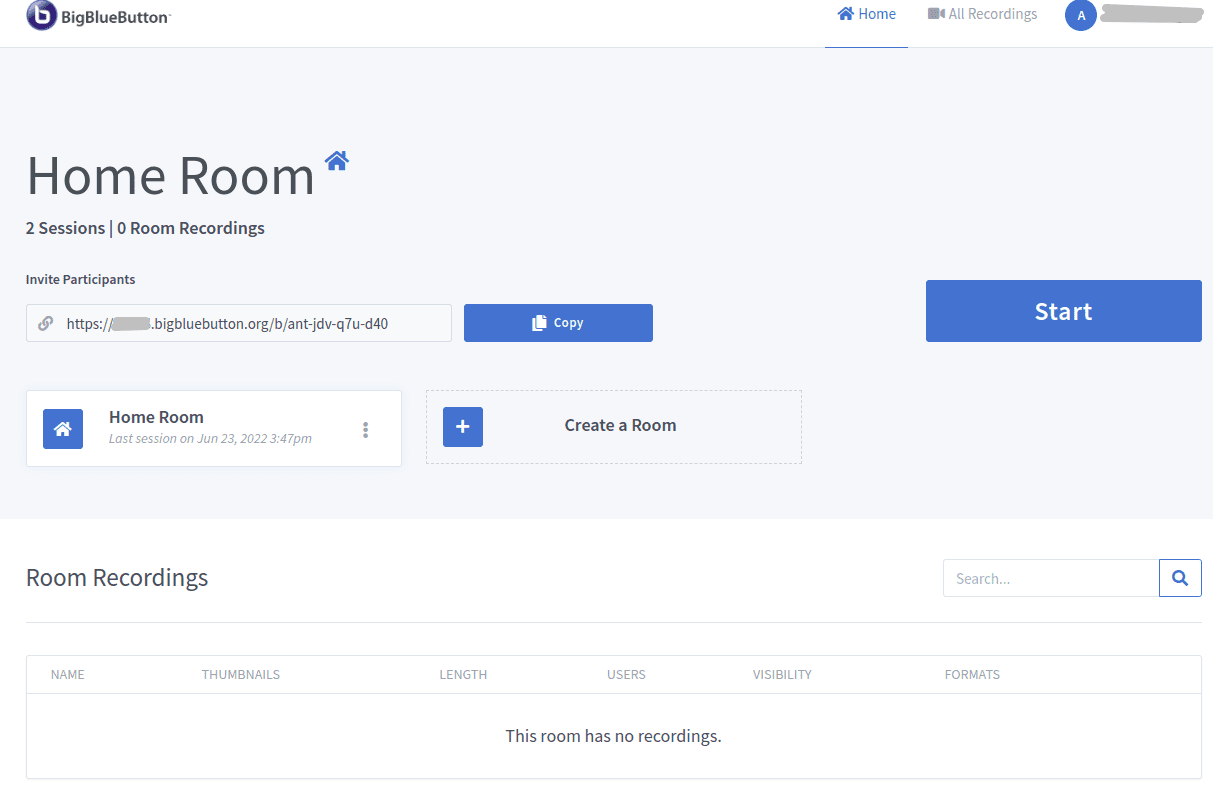
With Greenlight installed (that was the -g option), you can open https://<hostname>/b in a browser (where <hostname> is the hostname you specified in the bbb-install-2.6.sh command), create a local account, create a room and join it.
You can integrate BigBlueButton with one of the 3rd party integrations by providing the integration of the server's address and shared secret. You can use bbb-conf to display this information using bbb-conf --secret.
$ sudo bbb-conf --secret

       URL: https://bbb.example.com/bigbluebutton/
    Secret: 330a8b08c3b4c61533e1d0c334

      Link to the API-Mate:
      https://mconf.github.io/api-mate/#server=https://bbb.example.com/bigbluebutton/&sharedSecret=330a8b08c3b4c61533e1d0c334
The link to API-Mate will open a page at https://mconf.github.io/api-mate/ and let you send valid API calls to your server. This makes it easy for testing wihthout any frontend like Greenlight.
Configure the firewall (if required)
Do you have a firewall between you and your users? If so, see configuring your firewall.
Upgrading BigBlueButton 2.6
You can upgrade by re-running the bbb-install-2.6.sh script again -- it will download and install the latest release of BigBlueButton 2.6.
Upgrading from BigBlueButton 2.5
You can upgrade in a few steps:
Make sure you don't have bbb-demo installed sudo apt purge bbb-demo
Then run the bbb-install-2.6.sh script -- it will download and install the latest release of BigBlueButton 2.6 on top of your old 2.5 version.
Make sure you read through the "what's new in 2.6" document https://docs.bigbluebutton.org/2.6/new and specifically https://docs.bigbluebutton.org/2.6/new#other-notable-changes
Upgrading from BigBlueButton 2.4
If you are upgrading BigBlueButton 2.4 or 2.3 we recommend you set up a new Ubuntu 20.04 server with BigBlueButton 2.5 and then copy over your existing recordings from the old server.
Restart your server
You can restart and check your BigBlueButton server at any time using the commands
$ sudo bbb-conf --restart
$ sudo bbb-conf --check
The bbb-conf --check scans some of the log files for error messages. Again, any output that followed Potential problems may indicate configuration errors or installation errors. In many cases, the messages will give you recommendations on how to resolve the issue.
If you see other warning messages check out the troubleshooting installation.
Post installation steps
If this server is intended for production, you should also
- Secure your system -- restrict access to specific ports
- Configure the server to work behind a firewall (if you have installed behind a firewall or on a server that has a public/private IP address)
- remove Greenlight (if you had it installed and is no longer needed)
- Set up a TURN server (if your server is on the Internet and you have users accessing it from behind restrictive firewalls)
- Test your HTTPS configuration. A well-respected site that can do a series of automated tests is https://www.ssllabs.com/ssltest/ - simply enter your server's hostname, optionally check the "Do not show results" check box if you would like to keep it private, then Submit. At time of writing, the configuration shown on this page should achieve an "A" ranking in the SSL Labs test page.
We provide publically accessible servers that you can use for testing:
- https://demo.bigbluebutton.org - a pool of BigBlueButton servers with the Greenlight front-end (sometimes the pool is a mix of different BigBlueButton releases)
- https://test26.bigbluebutton.org - Runs the general build of BigBlueButton 2.6 - usually a few days behind the repository branch
v2.6.x-release
To learn more about integrating BigBlueButton with your application, check out the BigBlueButton API documentation. To see videos of BigBlueButton HTML5 client, see https://bigbluebutton.org/html5.
Other installation options
There are members of the community that provide other installation options for BigBlueButton.
Ansible
If you're looking to deploy a large-scale installation of BBB using Scalelite then your servers are best managed using tools like Ansible. A few reasons you might go with this setup are:
- easily customizable: your custom configurations will get replaced every time you upgrade automatically
- parity across machines: ensure that you deploy the exact same version of BBB on every server
- eliminate human error in setup: using bbb-install-2.6.sh or step-by-step methods are highly prone to human error as you can easily forget if you enabled a setting, chose to do X over Y, etc
- automate to the fullest: by automating the process, you inherently save time on nasty troubleshooting and hours lost in manual configuration
- easily scale at large: spin up an identical replica of your BBB server in less than 15 mins with no user input -- preconfigured and ready to go
Choose this method if you are already comfortable with a lot of the technical knowledge behind BigBlueButton, Scalelite and Greenlight/other front-ends. Refer to the following examples to create your installation.
Note: These examples are not maintained or developed by the official BigBlueButton developers. These are entirely community-sourced, use at your own discretion.
These first two install BigBlueButton on your server in a consistent fashion. You can specify variables, such as whether to install Greenlight too, what ports to use for TURN, and others. Functionally quite similar to bbb-install-2.6.sh but highly automated.
Large scale deployments must include several other components in addition to the core BigBlueButton packages. These include Scalelite, Greenlight, a database, backups, nginx configurations, and more.
- Full out-of-the-box setup with wiki, chat, backups
- Full out-of-the-box setup with frontend on one machine
- Full setup for a university
- Full HA setup with PeerTube, Conferences Streaming, EFK, Prometheus, backups
Customizations
See the Server customization page for things you can do to adapt BigBlueButton to your environment or enable optional features after installation. For example
Troubleshooting
Package locales-all is not available
The package bbb-libreoffice needs to build a docker image for libreoffice. If you receive the following error when installing on a network behind a firewall
Package locales-all is not available, but is referred to by another package.
This may mean that the package is missing, has been obsoleted, or
is only available from another source

E: Package 'locales-all' has no installation candidate
E: Unable to locate package libxt6
E: Unable to locate package libxrender1
The command '/bin/sh -c apt -y install locales-all fontconfig libxt6 libxrender1' returned a non-zero code: 100
dpkg: error processing package bbb-libreoffice-docker (--configure):
 installed bbb-libreoffice-docker package post-installation script subprocess returned error exit status 100
Ubuntu 20.04 uses systemd-resolved, which presents a local caching resolver and registers this at /etc/resolv.conf. If you get they above error and have a local name server, such as 10.11.12.13, then try adding it with the hosts resolv.conf.
echo "nameserver 10.11.12.13" > /etc/resolv.conf
For more details see this issue.
Feedback and reporting bugs
If you found a reproducible bug, please report it in the GitHub Issues section with steps to reproduce (this will make it easier for the developers to fix the bug). Indicate in the body of the bug report that this applies to BigBlueButton 2.6 and give us the client build number, which you can find either with dpkg -l | grep bbb-html5 or within the client in the Settings -> About menu..